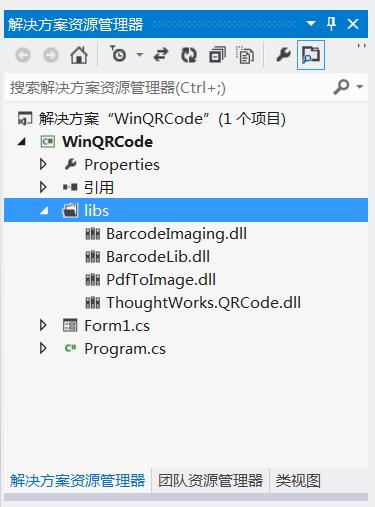
namespace WinQRCode
{
  partial class Form1
  {
    /// summary>
    /// 必需的設計器變量。
    /// /summary>
    private System.ComponentModel.IContainer components = null;

    /// summary>
    /// 清理所有正在使用的資源。
    /// /summary>
    /// param name="disposing">如果應釋放托管資源,為 true;否則為 false。/param>
    protected override void Dispose(bool disposing)
    {
      if (disposing  (components != null))
      {
        components.Dispose();
      }
      base.Dispose(disposing);
    }

    #region Windows 窗體設計器生成的代碼

    /// summary>
    /// 設計器支持所需的方法 - 不要
    /// 使用代碼編輯器修改此方法的內容。
    /// /summary>
    private void InitializeComponent()
    {
      this.button1 = new System.Windows.Forms.Button();
      this.button2 = new System.Windows.Forms.Button();
      this.pictureBox1 = new System.Windows.Forms.PictureBox();
      this.label1 = new System.Windows.Forms.Label();
      this.textBox1 = new System.Windows.Forms.TextBox();
      this.label2 = new System.Windows.Forms.Label();
      this.lbl解碼信息 = new System.Windows.Forms.Label();
      ((System.ComponentModel.ISupportInitialize)(this.pictureBox1)).BeginInit();
      this.SuspendLayout();
      //
      // button1
      //
      this.button1.Location = new System.Drawing.Point(446, 31);
      this.button1.Margin = new System.Windows.Forms.Padding(4, 5, 4, 5);
      this.button1.Name = "button1";
      this.button1.Size = new System.Drawing.Size(103, 37);
      this.button1.TabIndex = 0;
      this.button1.Text = "編碼";
      this.button1.UseVisualStyleBackColor = true;
      this.button1.Click += new System.EventHandler(this.button1_Click);
      //
      // button2
      //
      this.button2.Location = new System.Drawing.Point(446, 81);
      this.button2.Margin = new System.Windows.Forms.Padding(4, 5, 4, 5);
      this.button2.Name = "button2";
      this.button2.Size = new System.Drawing.Size(103, 37);
      this.button2.TabIndex = 1;
      this.button2.Text = "解碼";
      this.button2.UseVisualStyleBackColor = true;
      this.button2.Click += new System.EventHandler(this.button2_Click);
      //
      // pictureBox1
      //
      this.pictureBox1.Location = new System.Drawing.Point(23, 117);
      this.pictureBox1.Margin = new System.Windows.Forms.Padding(4, 5, 4, 5);
      this.pictureBox1.Name = "pictureBox1";
      this.pictureBox1.Size = new System.Drawing.Size(279, 253);
      this.pictureBox1.SizeMode = System.Windows.Forms.PictureBoxSizeMode.StretchImage;
      this.pictureBox1.TabIndex = 2;
      this.pictureBox1.TabStop = false;
      //
      // label1
      //
      this.label1.AutoSize = true;
      this.label1.Location = new System.Drawing.Point(18, 39);
      this.label1.Margin = new System.Windows.Forms.Padding(4, 0, 4, 0);
      this.label1.Name = "label1";
      this.label1.Size = new System.Drawing.Size(69, 25);
      this.label1.TabIndex = 3;
      this.label1.Text = "信息:";
      //
      // textBox1
      //
      this.textBox1.Location = new System.Drawing.Point(95, 37);
      this.textBox1.Margin = new System.Windows.Forms.Padding(4, 5, 4, 5);
      this.textBox1.Name = "textBox1";
      this.textBox1.Size = new System.Drawing.Size(333, 31);
      this.textBox1.TabIndex = 4;
      //
      // label2
      //
      this.label2.AutoSize = true;
      this.label2.Location = new System.Drawing.Point(18, 81);
      this.label2.Margin = new System.Windows.Forms.Padding(4, 0, 4, 0);
      this.label2.Name = "label2";
      this.label2.Size = new System.Drawing.Size(88, 25);
      this.label2.TabIndex = 5;
      this.label2.Text = "二維碼:";
      //
      // lbl解碼信息
      //
      this.lbl解碼信息.AutoSize = true;
      this.lbl解碼信息.Location = new System.Drawing.Point(101, 81);
      this.lbl解碼信息.Margin = new System.Windows.Forms.Padding(4, 0, 4, 0);
      this.lbl解碼信息.Name = "lbl解碼信息";
      this.lbl解碼信息.Size = new System.Drawing.Size(0, 25);
      this.lbl解碼信息.TabIndex = 6;
      //
      // Form1
      //
      this.AutoScaleDimensions = new System.Drawing.SizeF(11F, 24F);
      this.AutoScaleMode = System.Windows.Forms.AutoScaleMode.Font;
      this.ClientSize = new System.Drawing.Size(572, 384);
      this.Controls.Add(this.lbl解碼信息);
      this.Controls.Add(this.label2);
      this.Controls.Add(this.textBox1);
      this.Controls.Add(this.label1);
      this.Controls.Add(this.pictureBox1);
      this.Controls.Add(this.button2);
      this.Controls.Add(this.button1);
      this.Font = new System.Drawing.Font("微軟雅黑", 10.8F, System.Drawing.FontStyle.Regular, System.Drawing.GraphicsUnit.Point, ((byte)(134)));
      this.Margin = new System.Windows.Forms.Padding(4, 5, 4, 5);
      this.Name = "Form1";
      this.Text = "二維碼";
      ((System.ComponentModel.ISupportInitialize)(this.pictureBox1)).EndInit();
      this.ResumeLayout(false);
      this.PerformLayout();

    }

    #endregion

    private System.Windows.Forms.Button button1;
    private System.Windows.Forms.Button button2;
    private System.Windows.Forms.PictureBox pictureBox1;
    private System.Windows.Forms.Label label1;
    private System.Windows.Forms.TextBox textBox1;
    private System.Windows.Forms.Label label2;
    private System.Windows.Forms.Label lbl解碼信息;
  }
}
using System;
using System.Collections.Generic;
using System.ComponentModel;
using System.Data;
using System.Drawing;
using System.Linq;
using System.Text;
using System.Windows.Forms;

namespace WinQRCode
{
  using ThoughtWorks.QRCode.Codec;
  using ThoughtWorks.QRCode.Codec.Data;
  using ThoughtWorks.QRCode.Codec.Util;
  using System.IO;
  using PdfToImage;
  public partial class Form1 : Form
  {
    public Form1()
    {
      InitializeComponent();
    }
    /// summary>
    /// 編碼
    /// /summary>
    /// param name="sender">/param>
    /// param name="e">/param>
    private void button1_Click(object sender, EventArgs e)
    {
      if (this.textBox1.Text != "")
      {
        Cursor.Current = Cursors.WaitCursor;
        if (textBox1.Text.Trim() == String.Empty)
        {
          MessageBox.Show("不能為空.");
          return;
        }
        QRCodeEncoder qrCodeEncoder = new QRCodeEncoder();
        qrCodeEncoder.QRCodeEncodeMode = QRCodeEncoder.ENCODE_MODE.BYTE;
        qrCodeEncoder.QRCodeScale = 4;
        qrCodeEncoder.QRCodeVersion = 7;
        qrCodeEncoder.QRCodeErrorCorrect = QRCodeEncoder.ERROR_CORRECTION.M;
        System.Drawing.Image image;
        String data = textBox1.Text;
        //編碼
        image = qrCodeEncoder.Encode(data);
        //圖片顯示
        this.pictureBox1.Image = image;
        Cursor.Current = Cursors.Default;

      }
    }
    /// summary>
    /// 解碼
    /// /summary>
    /// param name="sender">/param>
    /// param name="e">/param>
    private void button2_Click(object sender, EventArgs e)
    {
      Cursor.Current = Cursors.WaitCursor;
      Bitmap b = this.pictureBox1.Image as Bitmap;
      try
      {
        QRCodeDecoder decoder = new QRCodeDecoder();
        //解碼
        String decodedString = decoder.decode(new QRCodeBitmapImage(b));
        //顯示解碼信息
        this.lbl解碼信息.Text += decodedString ;
      }
      catch (Exception ex)
      {
        MessageBox.Show(ex.Message);
      }
      Cursor.Current = Cursors.Default;
    }

    private void Form1_Load(object sender, EventArgs e)
    {

    }
  }
}